MLflow Integration
MLflow Overview
Section titled “MLflow Overview”MLflow is an open-source platform to assist machine learning practitioners and teams in handling the complexities of the machine learning process.
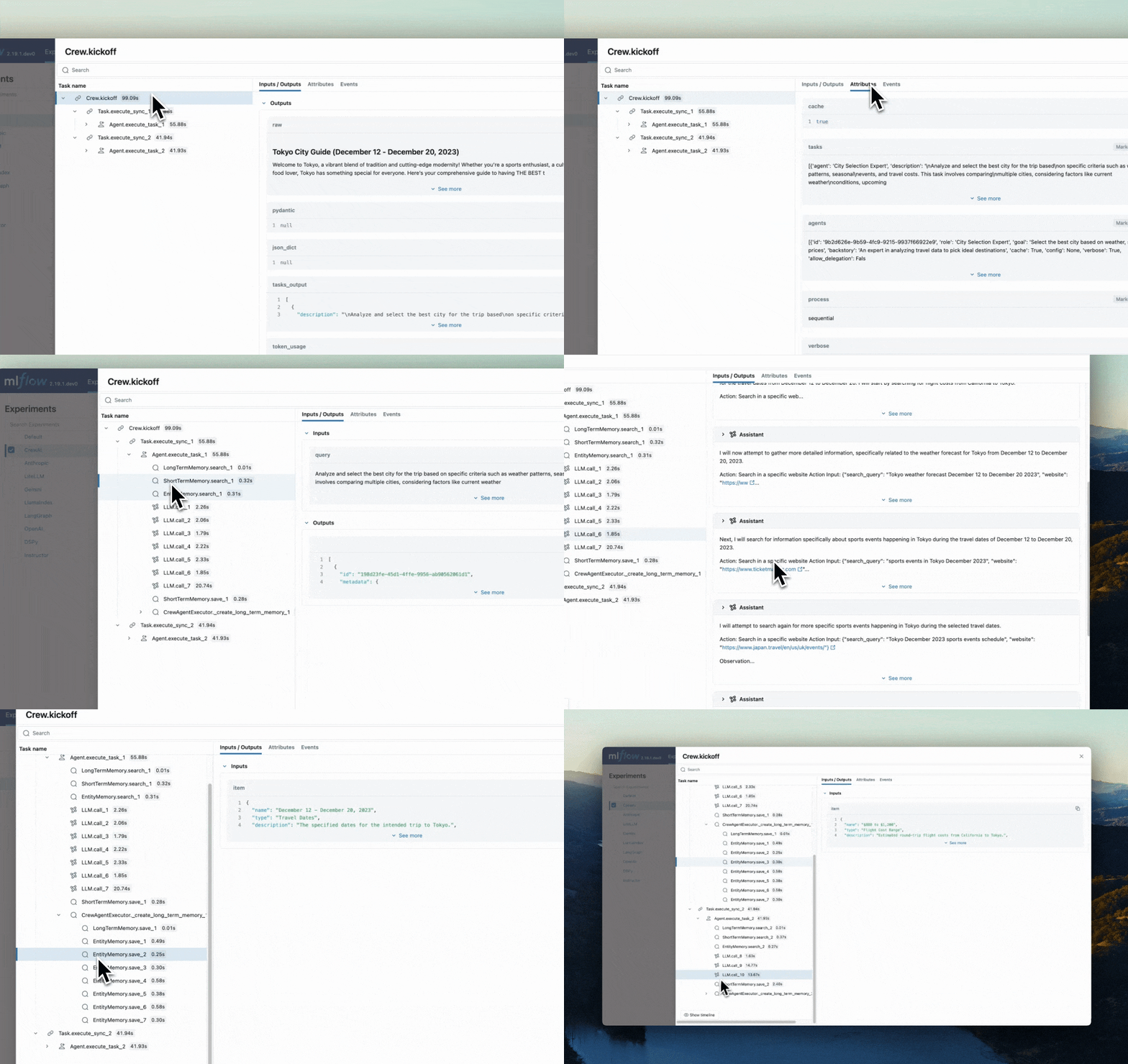
It provides a tracing feature that enhances LLM observability in your Generative AI applications by capturing detailed information about the execution of your application’s services. Tracing provides a way to record the inputs, outputs, and metadata associated with each intermediate step of a request, enabling you to easily pinpoint the source of bugs and unexpected behaviors.
Features
Section titled “Features”- Tracing Dashboard: Monitor activities of your crewAI agents with detailed dashboards that include inputs, outputs and metadata of spans.
- Automated Tracing: A fully automated integration with crewAI, which can be enabled by running
mlflow.crewai.autolog(). - Manual Trace Instrumentation with minor efforts: Customize trace instrumentation through MLflow’s high-level fluent APIs such as decorators, function wrappers and context managers.
- OpenTelemetry Compatibility: MLflow Tracing supports exporting traces to an OpenTelemetry Collector, which can then be used to export traces to various backends such as Jaeger, Zipkin, and AWS X-Ray.
- Package and Deploy Agents: Package and deploy your crewAI agents to an inference server with a variety of deployment targets.
- Securely Host LLMs: Host multiple LLM from various providers in one unified endpoint through MFflow gateway.
- Evaluation: Evaluate your crewAI agents with a wide range of metrics using a convenient API
mlflow.evaluate().
Setup Instructions
Section titled “Setup Instructions”- Install MLflow package
Terminal window # The crewAI integration is available in mlflow>=2.19.0pip install mlflow - Start MFflow tracking server
Terminal window # This process is optional, but it is recommended to use MLflow tracking server for better visualization and broader features.mlflow server - Initialize MLflow in Your Application
Add the following two lines to your application code:
import mlflowmlflow.crewai.autolog()# Optional: Set a tracking URI and an experiment name if you have a tracking servermlflow.set_tracking_uri("http://localhost:5000")mlflow.set_experiment("CrewAI")Example Usage for tracing CrewAI Agents:
from crewai import Agent, Crew, Taskfrom crewai.knowledge.source.string_knowledge_source import StringKnowledgeSourcefrom crewai_tools import SerperDevTool, WebsiteSearchToolfrom textwrap import dedentcontent = "Users name is John. He is 30 years old and lives in San Francisco."string_source = StringKnowledgeSource(content=content, metadata={"preference": "personal"})search_tool = WebsiteSearchTool()class TripAgents:def city_selection_agent(self):return Agent(role="City Selection Expert",goal="Select the best city based on weather, season, and prices",backstory="An expert in analyzing travel data to pick ideal destinations",tools=[search_tool,],verbose=True,)def local_expert(self):return Agent(role="Local Expert at this city",goal="Provide the BEST insights about the selected city",backstory="""A knowledgeable local guide with extensive informationabout the city, it's attractions and customs""",tools=[search_tool],verbose=True,)class TripTasks:def identify_task(self, agent, origin, cities, interests, range):return Task(description=dedent(f"""Analyze and select the best city for the trip basedon specific criteria such as weather patterns, seasonalevents, and travel costs. This task involves comparingmultiple cities, considering factors like current weatherconditions, upcoming cultural or seasonal events, andoverall travel expenses.Your final answer must be a detailedreport on the chosen city, and everything you found outabout it, including the actual flight costs, weatherforecast and attractions.Traveling from: {origin}City Options: {cities}Trip Date: {range}Traveler Interests: {interests}"""),agent=agent,expected_output="Detailed report on the chosen city including flight costs, weather forecast, and attractions",)def gather_task(self, agent, origin, interests, range):return Task(description=dedent(f"""As a local expert on this city you must compile anin-depth guide for someone traveling there and wantingto have THE BEST trip ever!Gather information about key attractions, local customs,special events, and daily activity recommendations.Find the best spots to go to, the kind of place only alocal would know.This guide should provide a thorough overview of whatthe city has to offer, including hidden gems, culturalhotspots, must-visit landmarks, weather forecasts, andhigh level costs.The final answer must be a comprehensive city guide,rich in cultural insights and practical tips,tailored to enhance the travel experience.Trip Date: {range}Traveling from: {origin}Traveler Interests: {interests}"""),agent=agent,expected_output="Comprehensive city guide including hidden gems, cultural hotspots, and practical travel tips",)class TripCrew:def __init__(self, origin, cities, date_range, interests):self.cities = citiesself.origin = originself.interests = interestsself.date_range = date_rangedef run(self):agents = TripAgents()tasks = TripTasks()city_selector_agent = agents.city_selection_agent()local_expert_agent = agents.local_expert()identify_task = tasks.identify_task(city_selector_agent,self.origin,self.cities,self.interests,self.date_range,)gather_task = tasks.gather_task(local_expert_agent, self.origin, self.interests, self.date_range)crew = Crew(agents=[city_selector_agent, local_expert_agent],tasks=[identify_task, gather_task],verbose=True,memory=True,knowledge={"sources": [string_source],"metadata": {"preference": "personal"},},)result = crew.kickoff()return resulttrip_crew = TripCrew("California", "Tokyo", "Dec 12 - Dec 20", "sports")result = trip_crew.run()print(result)Refer to MLflow Tracing Documentation for more configurations and use cases.
- Visualize Activities of Agents
Now traces for your crewAI agents are captured by MLflow. Let’s visit MLflow tracking server to view the traces and get insights into your Agents.
Open
127.0.0.1:5000on your browser to visit MLflow tracking server.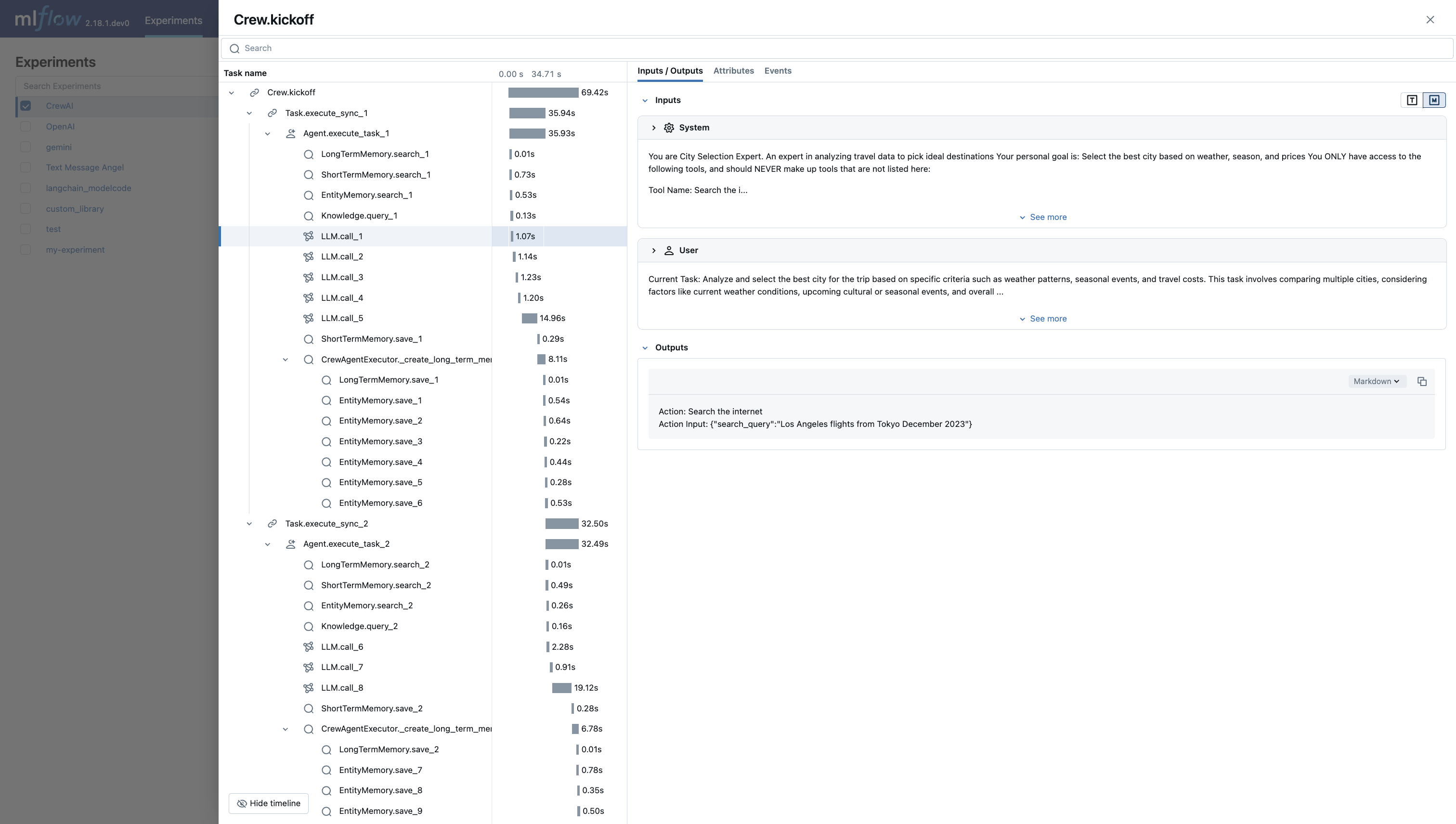
MLflow Tracing Dashboard