Agent Control Plane Overview
Overview
Section titled “Overview”The Agent Control Plane (ACP) is the operations hub for everything you have running on CrewAI AMP. It is a single screen — split into Automations and Rules tabs — that lets your team:
- Monitor the health of every live automation (crew or flow), with
Critical/Warning/Healthybreakdowns and execution counts. - Track LLM consumption — tokens and cost — per automation, per provider, and per model, with a delta vs the previous period.
- Drill into any single automation or model provider for time-series charts and per-provider breakdowns.
- Apply organization-wide Rules (today: PII Redaction) across many automations at once instead of editing each deployment individually.
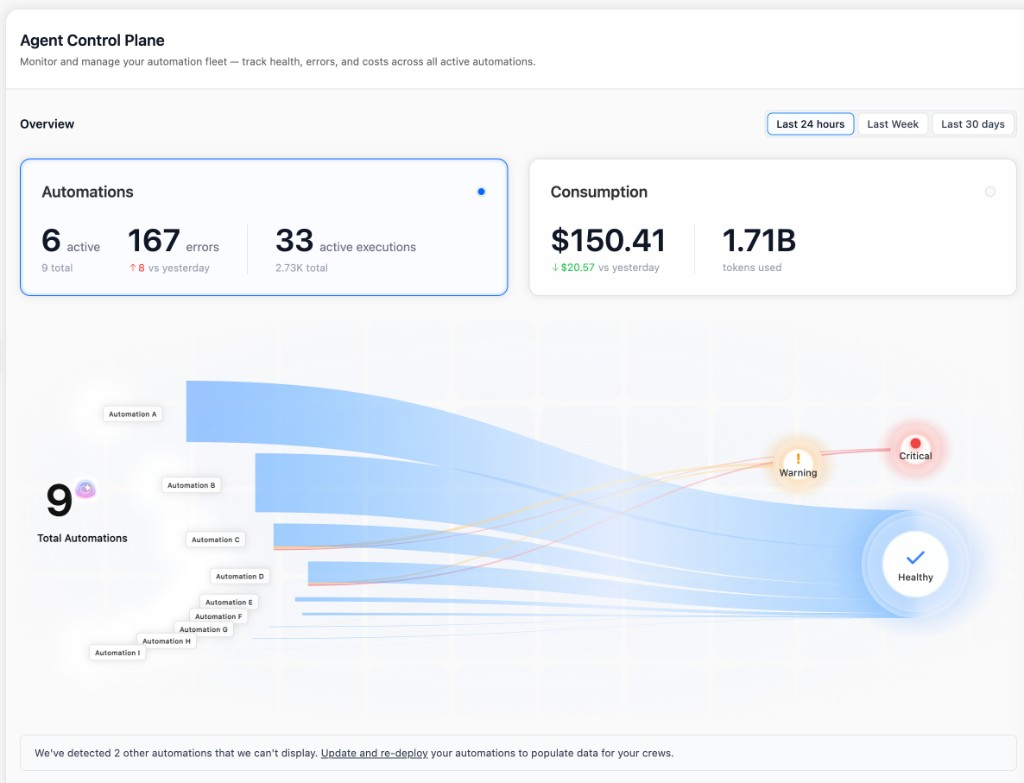
The two tabs answer two different questions:
- Automations — “How is my fleet behaving right now, and what is it costing me?” See Monitoring.
- Rules — “How do I enforce a policy (e.g. PII redaction) across many deployments without re-deploying each one?” See Rules.
Requirements
Section titled “Requirements”- The Agent Control Plane feature must be enabled for your organization. If you don’t see it in the sidebar, ask your account owner to request enablement.
- Inside ACP, RBAC governs access:
readto view the dashboard and rules,manageto create, edit, toggle, or delete rules. - All charts and tables can be scoped to the Last 24 hours, Last Week, or Last 30 days using the time selector at the top right. Deltas (
↑ 8 vs yesterday,↓ $20.57 vs yesterday, etc.) compare the selected window against the previous one of the same length.
What you can do here
Section titled “What you can do here”Monitoring
Watch fleet health and LLM spend with metric cards, an interactive sankey, per-automation tables, and drill-down side panels for any automation or provider.
Rules
Apply organization-wide PII Redaction policies scoped by tools and tags. Changes take effect on the next execution — no re-deploy required.
Related
Section titled “Related”Traces
Drill into a single execution to see agent reasoning, tool calls, and token usage.
RBAC
Manage who can read the Agent Control Plane and who can edit rules.
PII Redaction for Traces
Entity catalog and per-deployment PII configuration referenced by Rules.
Deploy to AMP
Deploy a crew on a crewAI version that supports the Agent Control Plane.
Need Help?
Contact our support team for help interpreting metrics or designing rules.