Introduction
What is CrewAI?
Section titled “What is CrewAI?”CrewAI is the leading open-source framework for orchestrating autonomous AI agents and building complex workflows.
It empowers developers to build production-ready multi-agent systems by combining the collaborative intelligence of Crews with the precise control of Flows.
- CrewAI Flows: The backbone of your AI application. Flows allow you to create structured, event-driven workflows that manage state and control execution. They provide the scaffolding for your AI agents to work within.
- CrewAI Crews: The units of work within your Flow. Crews are teams of autonomous agents that collaborate to solve specific tasks delegated to them by the Flow.
With over 100,000 developers certified through our community courses, CrewAI is the standard for enterprise-ready AI automation.
Watch: Building CrewAI Agents & Flows with Coding Agent Skills
Section titled “Watch: Building CrewAI Agents & Flows with Coding Agent Skills”Install our coding agent skills (Claude Code, Codex, …) to quickly get your coding agents up and running with CrewAI.
You can install it with npx skills add crewaiinc/skills
The CrewAI Architecture
Section titled “The CrewAI Architecture”CrewAI’s architecture is designed to balance autonomy with control.
1. Flows: The Backbone
Section titled “1. Flows: The Backbone”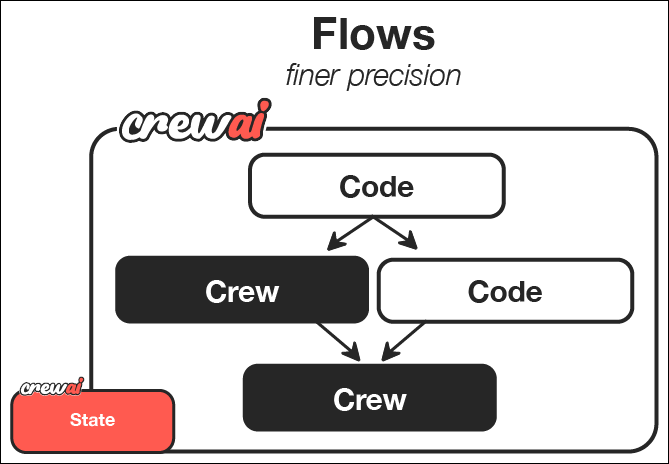
Flows provide:
- State Management: Persist data across steps and executions.
- Event-Driven Execution: Trigger actions based on events or external inputs.
- Control Flow: Use conditional logic, loops, and branching.
2. Crews: The Intelligence
Section titled “2. Crews: The Intelligence”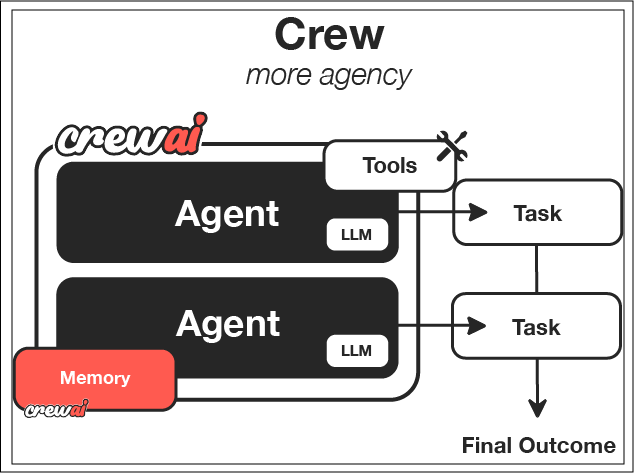
Crews provide:
- Role-Playing Agents: Specialized agents with specific goals and tools.
- Autonomous Collaboration: Agents work together to solve tasks.
- Task Delegation: Tasks are assigned and executed based on agent capabilities.
How It All Works Together
Section titled “How It All Works Together”- The Flow triggers an event or starts a process.
- The Flow manages the state and decides what to do next.
- The Flow delegates a complex task to a Crew.
- The Crew’s agents collaborate to complete the task.
- The Crew returns the result to the Flow.
- The Flow continues execution based on the result.
Key Features
Section titled “Key Features”Production-Grade Flows
Build reliable, stateful workflows that can handle long-running processes and complex logic.
Autonomous Crews
Deploy teams of agents that can plan, execute, and collaborate to achieve high-level goals.
Flexible Tools
Connect your agents to any API, database, or local tool.
Enterprise Security
Designed with security and compliance in mind for enterprise deployments.
When to Use Crews vs. Flows
Section titled “When to Use Crews vs. Flows”The short answer: Use both.
For any production-ready application, start with a Flow.
- Use a Flow to define the overall structure, state, and logic of your application.
- Use a Crew within a Flow step when you need a team of agents to perform a specific, complex task that requires autonomy.
| Use Case | Architecture |
|---|---|
| Simple Automation | Single Flow with Python tasks |
| Complex Research | Flow managing state -> Crew performing research |
| Application Backend | Flow handling API requests -> Crew generating content -> Flow saving to DB |
Why Choose CrewAI?
Section titled “Why Choose CrewAI?”- 🧠 Autonomous Operation: Agents make intelligent decisions based on their roles and available tools
- 📝 Natural Interaction: Agents communicate and collaborate like human team members
- 🛠️ Extensible Design: Easy to add new tools, roles, and capabilities
- 🚀 Production Ready: Built for reliability and scalability in real-world applications
- 🔒 Security-Focused: Designed with enterprise security requirements in mind
- 💰 Cost-Efficient: Optimized to minimize token usage and API calls