LangDB Integration
Introduction
Section titled “Introduction”LangDB AI Gateway provides OpenAI-compatible APIs to connect with multiple Large Language Models and serves as an observability platform that makes it effortless to trace CrewAI workflows end-to-end while providing access to 350+ language models. With a single init() call, all agent interactions, task executions, and LLM calls are captured, providing comprehensive observability and production-ready AI infrastructure for your applications.
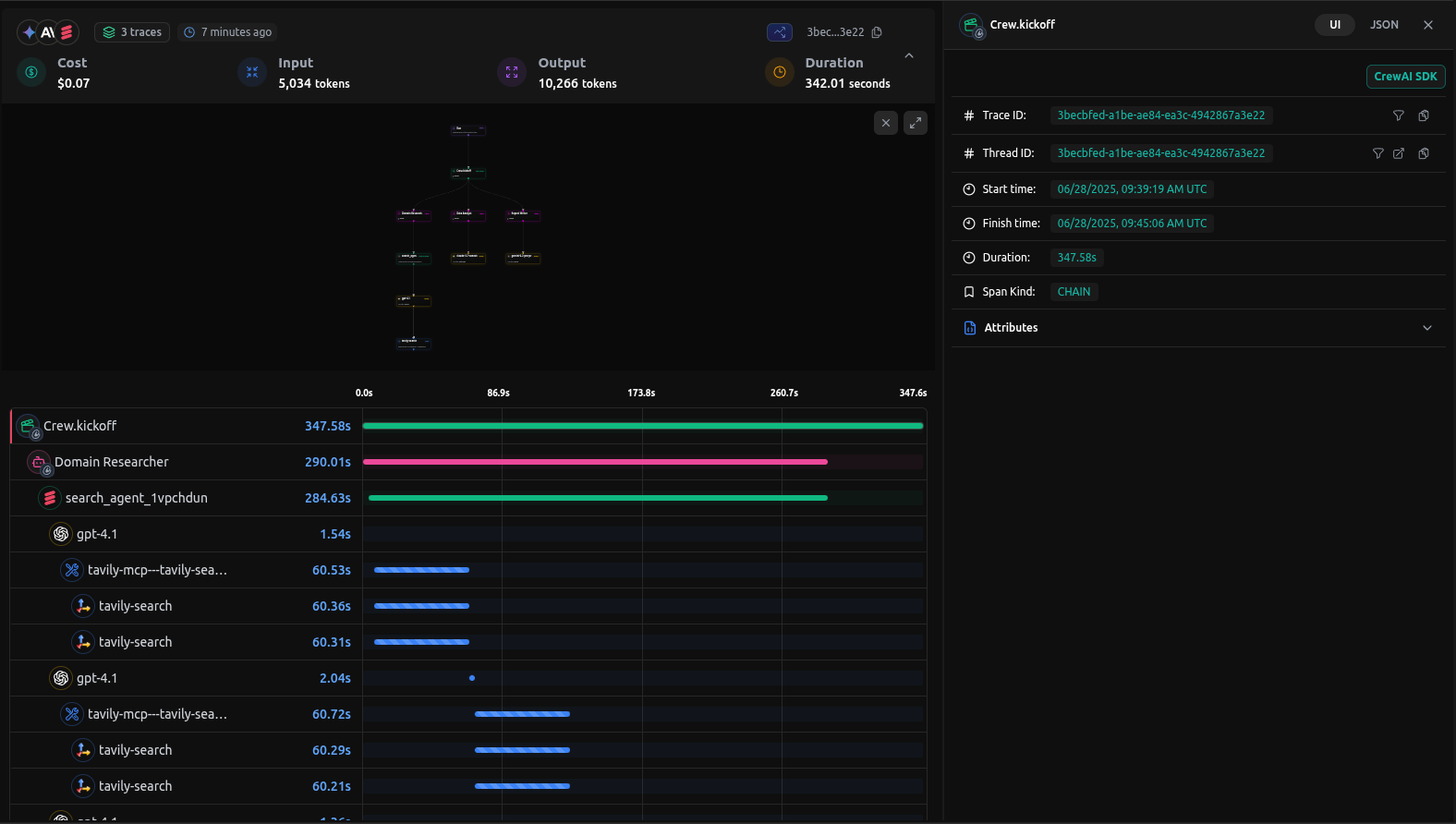
Checkout: View the live trace example
Features
Section titled “Features”AI Gateway Capabilities
Section titled “AI Gateway Capabilities”- Access to 350+ LLMs: Connect to all major language models through a single integration
- Virtual Models: Create custom model configurations with specific parameters and routing rules
- Virtual MCP: Enable compatibility and integration with MCP (Model Context Protocol) systems for enhanced agent communication
- Guardrails: Implement safety measures and compliance controls for agent behavior
Observability & Tracing
Section titled “Observability & Tracing”- Automatic Tracing: Single
init()call captures all CrewAI interactions - End-to-End Visibility: Monitor agent workflows from start to finish
- Tool Usage Tracking: Track which tools agents use and their outcomes
- Model Call Monitoring: Detailed insights into LLM interactions
- Performance Analytics: Monitor latency, token usage, and costs
- Debugging Support: Step-through execution for troubleshooting
- Real-time Monitoring: Live traces and metrics dashboard
Setup Instructions
Section titled “Setup Instructions”- Install LangDB
Install the LangDB client with CrewAI feature flag:
Terminal window pip install 'pylangdb[crewai]' - Set Environment Variables
Configure your LangDB credentials:
Terminal window export LANGDB_API_KEY="<your_langdb_api_key>"export LANGDB_PROJECT_ID="<your_langdb_project_id>"export LANGDB_API_BASE_URL='https://api.us-east-1.langdb.ai' - Initialize Tracing
Import and initialize LangDB before configuring your CrewAI code:
from pylangdb.crewai import init# Initialize LangDBinit() - Configure CrewAI with LangDB
Set up your LLM with LangDB headers:
from crewai import Agent, Task, Crew, LLMimport os# Configure LLM with LangDB headersllm = LLM(model="openai/gpt-4o", # Replace with the model you want to useapi_key=os.getenv("LANGDB_API_KEY"),base_url=os.getenv("LANGDB_API_BASE_URL"),extra_headers={"x-project-id": os.getenv("LANGDB_PROJECT_ID")})
Quick Start Example
Section titled “Quick Start Example”Here’s a simple example to get you started with LangDB and CrewAI:
import osfrom pylangdb.crewai import initfrom crewai import Agent, Task, Crew, LLM
# Initialize LangDB before any CrewAI importsinit()
def create_llm(model):    return LLM(        model=model,        api_key=os.environ.get("LANGDB_API_KEY"),        base_url=os.environ.get("LANGDB_API_BASE_URL"),        extra_headers={"x-project-id": os.environ.get("LANGDB_PROJECT_ID")}    )
# Define your agentresearcher = Agent(    role="Research Specialist",    goal="Research topics thoroughly",    backstory="Expert researcher with skills in finding information",    llm=create_llm("openai/gpt-4o"), # Replace with the model you want to use    verbose=True)
# Create a tasktask = Task(    description="Research the given topic and provide a comprehensive summary",    agent=researcher,    expected_output="Detailed research summary with key findings")
# Create and run the crewcrew = Crew(agents=[researcher], tasks=[task])result = crew.kickoff()print(result)
Complete Example: Research and Planning Agent
Section titled “Complete Example: Research and Planning Agent”This comprehensive example demonstrates a multi-agent workflow with research and planning capabilities.
Prerequisites
Section titled “Prerequisites”pip install crewai 'pylangdb[crewai]' crewai_tools setuptools python-dotenvEnvironment Setup
Section titled “Environment Setup”# LangDB credentialsexport LANGDB_API_KEY="<your_langdb_api_key>"export LANGDB_PROJECT_ID="<your_langdb_project_id>"export LANGDB_API_BASE_URL='https://api.us-east-1.langdb.ai'
# Additional API keys (optional)export SERPER_API_KEY="<your_serper_api_key>" # For web search capabilitiesComplete Implementation
Section titled “Complete Implementation”#!/usr/bin/env python3
import osimport sysfrom pylangdb.crewai import initinit() # Initialize LangDB before any CrewAI importsfrom dotenv import load_dotenvfrom crewai import Agent, Task, Crew, Process, LLMfrom crewai_tools import SerperDevTool
load_dotenv()
def create_llm(model): return LLM( model=model, api_key=os.environ.get("LANGDB_API_KEY"), base_url=os.environ.get("LANGDB_API_BASE_URL"), extra_headers={"x-project-id": os.environ.get("LANGDB_PROJECT_ID")} )
class ResearchPlanningCrew: def researcher(self) -> Agent: return Agent( role="Research Specialist", goal="Research topics thoroughly and compile comprehensive information", backstory="Expert researcher with skills in finding and analyzing information from various sources", tools=[SerperDevTool()], llm=create_llm("openai/gpt-4o"), verbose=True )
def planner(self) -> Agent: return Agent( role="Strategic Planner", goal="Create actionable plans based on research findings", backstory="Strategic planner who breaks down complex challenges into executable plans", reasoning=True, max_reasoning_attempts=3, llm=create_llm("openai/anthropic/claude-3.7-sonnet"), verbose=True )
def research_task(self) -> Task: return Task( description="Research the topic thoroughly and compile comprehensive information", agent=self.researcher(), expected_output="Comprehensive research report with key findings and insights" )
def planning_task(self) -> Task: return Task( description="Create a strategic plan based on the research findings", agent=self.planner(), expected_output="Strategic execution plan with phases, goals, and actionable steps", context=[self.research_task()] )
def crew(self) -> Crew: return Crew( agents=[self.researcher(), self.planner()], tasks=[self.research_task(), self.planning_task()], verbose=True, process=Process.sequential )
def main(): topic = sys.argv[1] if len(sys.argv) > 1 else "Artificial Intelligence in Healthcare"
crew_instance = ResearchPlanningCrew()
# Update task descriptions with the specific topic crew_instance.research_task().description = f"Research {topic} thoroughly and compile comprehensive information" crew_instance.planning_task().description = f"Create a strategic plan for {topic} based on the research findings"
result = crew_instance.crew().kickoff() print(result)
if __name__ == "__main__": main()Running the Example
Section titled “Running the Example”python main.py "Sustainable Energy Solutions"Viewing Traces in LangDB
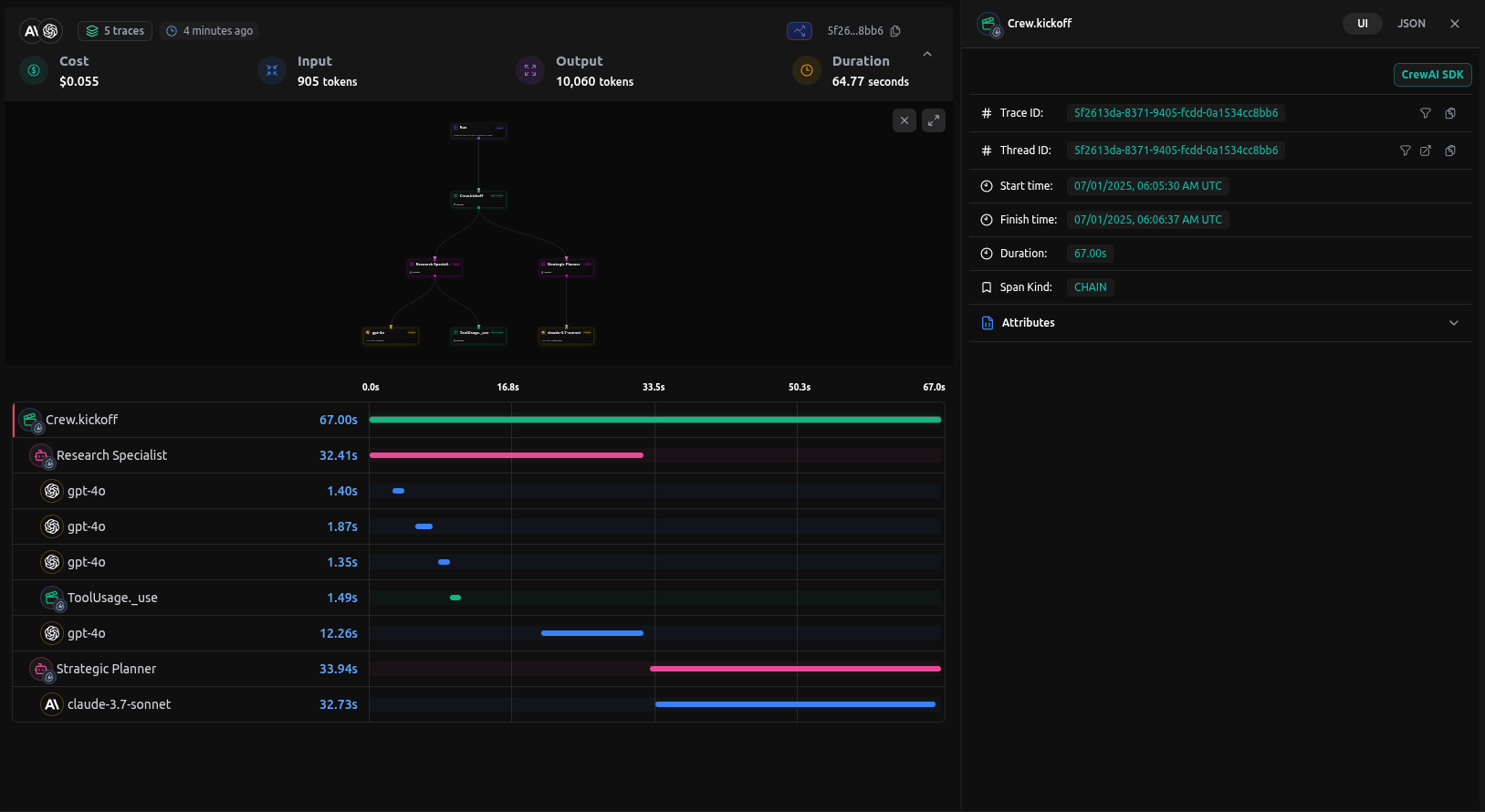
Section titled “Viewing Traces in LangDB”After running your CrewAI application, you can view detailed traces in the LangDB dashboard:
What You’ll See
Section titled “What You’ll See”- Agent Interactions: Complete flow of agent conversations and task handoffs
- Tool Usage: Which tools were called, their inputs, and outputs
- Model Calls: Detailed LLM interactions with prompts image.pngand responses
- Performance Metrics: Latency, token usage, and cost tracking
- Execution Timeline: Step-by-step view of the entire workflow
Troubleshooting
Section titled “Troubleshooting”Common Issues
Section titled “Common Issues”- No traces appearing: Ensure
init()is called before any CrewAI imports - Authentication errors: Verify your LangDB API key and project ID
Resources
Section titled “Resources”LangDB Documentation
Official LangDB documentation and guides
LangDB Guides
Step-by-step tutorials for building AI agents
GitHub Examples
Complete CrewAI integration examples
LangDB Dashboard
Access your traces and analytics
Model Catalog
Browse 350+ available language models
Enterprise Features
Self-hosted options and enterprise capabilities
Next Steps
Section titled “Next Steps”This guide covered the basics of integrating LangDB AI Gateway with CrewAI. To further enhance your AI workflows, explore:
- Virtual Models: Create custom model configurations with routing strategies
- Guardrails & Safety: Implement content filtering and compliance controls
- Production Deployment: Configure fallbacks, retries, and load balancing
For more advanced features and use cases, visit the LangDB Documentation or explore the Model Catalog to discover all available models.