Flow HITL Management
CrewAI Enterprise provides a comprehensive Human-in-the-Loop (HITL) management system for Flows that transforms AI workflows into collaborative human-AI processes. The platform uses an email-first architecture that enables anyone with an email address to respond to review requests—no platform account required.
Overview
Section titled “Overview”Email-First Design
Responders can reply directly to notification emails to provide feedback
Flexible Routing
Route requests to specific emails based on method patterns or flow state
Auto-Response
Configure automatic fallback responses when no human replies in time
Key Benefits
Section titled “Key Benefits”- Simple mental model: Email addresses are universal; no need to manage platform users or roles
- External responders: Anyone with an email can respond, even non-platform users
- Dynamic assignment: Pull assignee email directly from flow state (e.g.,
sales_rep_email) - Reduced configuration: Fewer settings to configure, faster time to value
- Email as primary channel: Most users prefer responding via email over logging into a dashboard
Setting Up Human Review Points in Flows
Section titled “Setting Up Human Review Points in Flows”Configure human review checkpoints within your Flows using the @human_feedback decorator. When execution reaches a review point, the system pauses, notifies the assignee via email, and waits for a response.
from crewai.flow.flow import Flow, start, listen, or_from crewai.flow.human_feedback import human_feedback, HumanFeedbackResult
class ContentApprovalFlow(Flow):    @start()    def generate_content(self):        return "Generated marketing copy for Q1 campaign..."
    @human_feedback(        message="Please review this content for brand compliance:",        emit=["approved", "rejected", "needs_revision"],    )    @listen(or_("generate_content", "needs_revision"))    def review_content(self):        return "Marketing copy for review..."
    @listen("approved")    def publish_content(self, result: HumanFeedbackResult):        print(f"Publishing approved content. Reviewer notes: {result.feedback}")
    @listen("rejected")    def archive_content(self, result: HumanFeedbackResult):        print(f"Content rejected. Reason: {result.feedback}")
For complete implementation details, see the Human Feedback in Flows guide.
Decorator Parameters
Section titled “Decorator Parameters”| Parameter | Type | Description |
|---|---|---|
message | str | The message displayed to the human reviewer |
emit | list[str] | Valid response options (displayed as buttons in UI) |
Platform Configuration
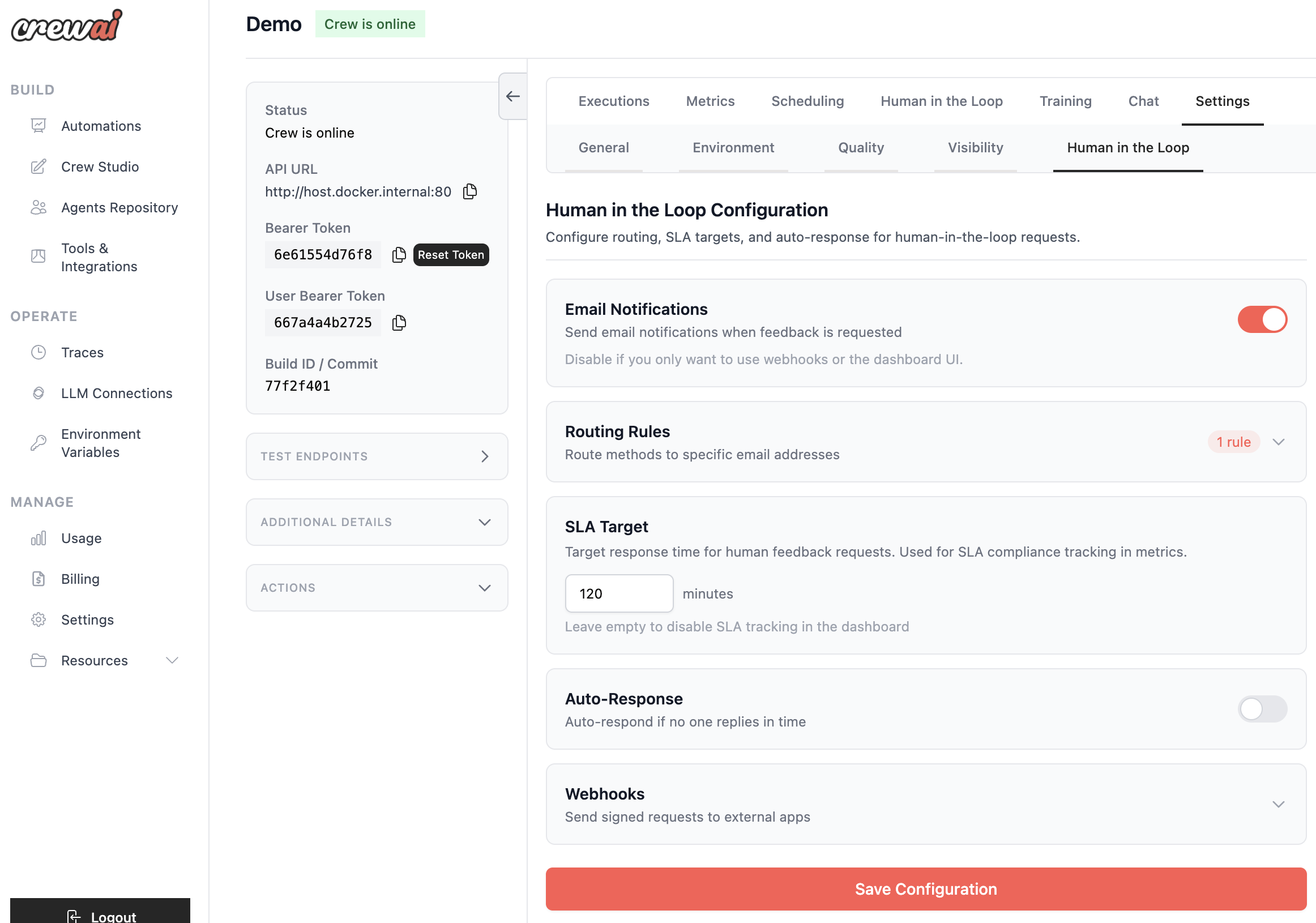
Section titled “Platform Configuration”Access HITL configuration from: Deployment → Settings → Human in the Loop Configuration
Email Notifications
Section titled “Email Notifications”Toggle to enable or disable email notifications for HITL requests.
| Setting | Default | Description |
|---|---|---|
| Email Notifications | Enabled | Send emails when feedback is requested |
SLA Target
Section titled “SLA Target”Set a target response time for tracking and metrics purposes.
| Setting | Description |
|---|---|
| SLA Target (minutes) | Target response time. Used for dashboard metrics and SLA tracking |
Leave empty to disable SLA tracking.
Email Notifications & Responses
Section titled “Email Notifications & Responses”The HITL system uses an email-first architecture where responders can reply directly to notification emails.
How Email Responses Work
Section titled “How Email Responses Work”- Notification Sent
When a HITL request is created, an email is sent to the assigned responder with the review content and context.
- Reply-To Address
The email includes a special reply-to address with a signed token for authentication.
- User Replies
The responder simply replies to the email with their feedback—no login required.
- Token Validation
The platform receives the reply, verifies the signed token, and matches the sender email.
- Flow Resumes
The feedback is recorded and the flow continues with the human’s input.
Response Format
Section titled “Response Format”Responders can reply with:
- Emit option: If the reply matches an
emitoption (e.g., “approved”), it’s used directly - Free-form text: Any text response is passed to the flow as feedback
- Plain text: The first line of the reply body is used as feedback
Confirmation Emails
Section titled “Confirmation Emails”After processing a reply, the responder receives a confirmation email indicating whether the feedback was successfully submitted or if an error occurred.
Email Token Security
Section titled “Email Token Security”- Tokens are cryptographically signed for security
- Tokens expire after 7 days
- Sender email must match the token’s authorized email
- Confirmation/error emails are sent after processing
Routing Rules
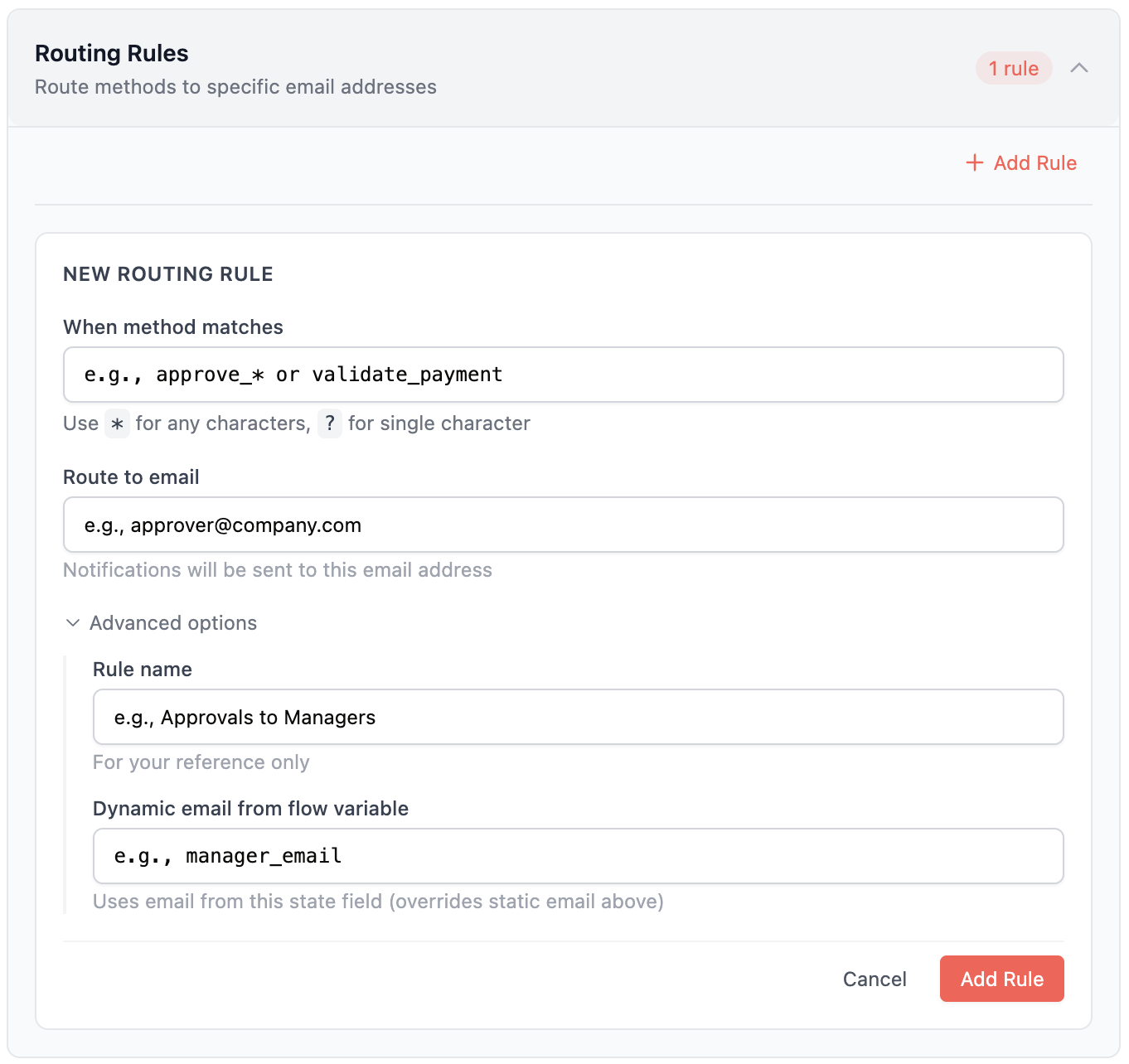
Section titled “Routing Rules”Route HITL requests to specific email addresses based on method patterns.
Rule Structure
Section titled “Rule Structure”{ "name": "Approvals to Finance", "match": { "method_name": "approve_*" }, "assign_to_email": "finance@company.com", "assign_from_input": "manager_email"}Matching Patterns
Section titled “Matching Patterns”| Pattern | Description | Example Match |
|---|---|---|
approve_* | Wildcard (any chars) | approve_payment, approve_vendor |
review_? | Single char | review_a, review_1 |
validate_payment | Exact match | validate_payment only |
Assignment Priority
Section titled “Assignment Priority”- Dynamic assignment (
assign_from_input): If configured, pulls email from flow state - Static email (
assign_to_email): Falls back to configured email - Deployment creator: If no rule matches, the deployment creator’s email is used
Dynamic Assignment Example
Section titled “Dynamic Assignment Example”If your flow state contains {"sales_rep_email": "alice@company.com"}, configure:
{ "name": "Route to Sales Rep", "match": { "method_name": "review_*" }, "assign_from_input": "sales_rep_email"}The request will be assigned to alice@company.com automatically.
Auto-Response
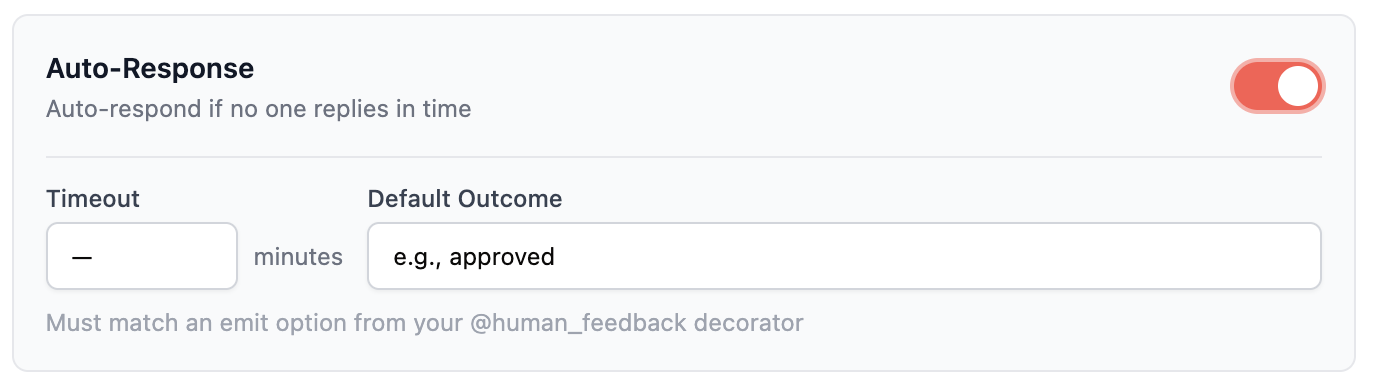
Section titled “Auto-Response”Automatically respond to HITL requests if no human responds within a timeout. This ensures flows don’t hang indefinitely.
Configuration
Section titled “Configuration”| Setting | Description |
|---|---|
| Enabled | Toggle to enable auto-response |
| Timeout (minutes) | Time to wait before auto-responding |
| Default Outcome | The response value (must match an emit option) |
Use Cases
Section titled “Use Cases”- SLA compliance: Ensure flows don’t hang indefinitely
- Default approval: Auto-approve low-risk requests after timeout
- Graceful degradation: Continue with a safe default when reviewers are unavailable
Review Process
Section titled “Review Process”Dashboard Interface
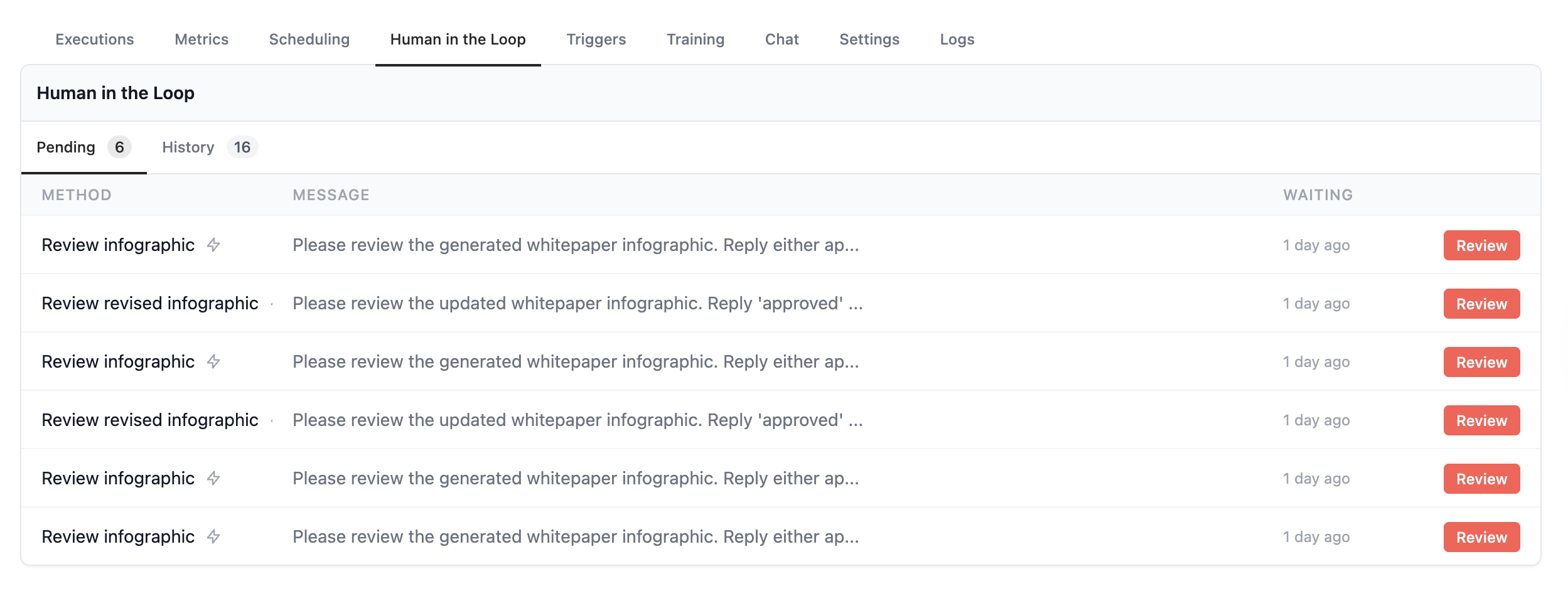
Section titled “Dashboard Interface”The HITL review interface provides a clean, focused experience for reviewers:
- Markdown Rendering: Rich formatting for review content with syntax highlighting
- Context Panel: View flow state, execution history, and related information
- Feedback Input: Provide detailed feedback and comments with your decision
- Quick Actions: One-click emit option buttons with optional comments
Response Methods
Section titled “Response Methods”Reviewers can respond via three channels:
| Method | Description |
|---|---|
| Email Reply | Reply directly to the notification email |
| Dashboard | Use the Enterprise dashboard UI |
| API/Webhook | Programmatic response via API |
History & Audit Trail
Section titled “History & Audit Trail”Every HITL interaction is tracked with a complete timeline:
- Decision history (approve/reject/revise)
- Reviewer identity and timestamp
- Feedback and comments provided
- Response method (email/dashboard/API)
- Response time metrics
Analytics & Monitoring
Section titled “Analytics & Monitoring”Track HITL performance with comprehensive analytics.
Performance Dashboard
Section titled “Performance Dashboard”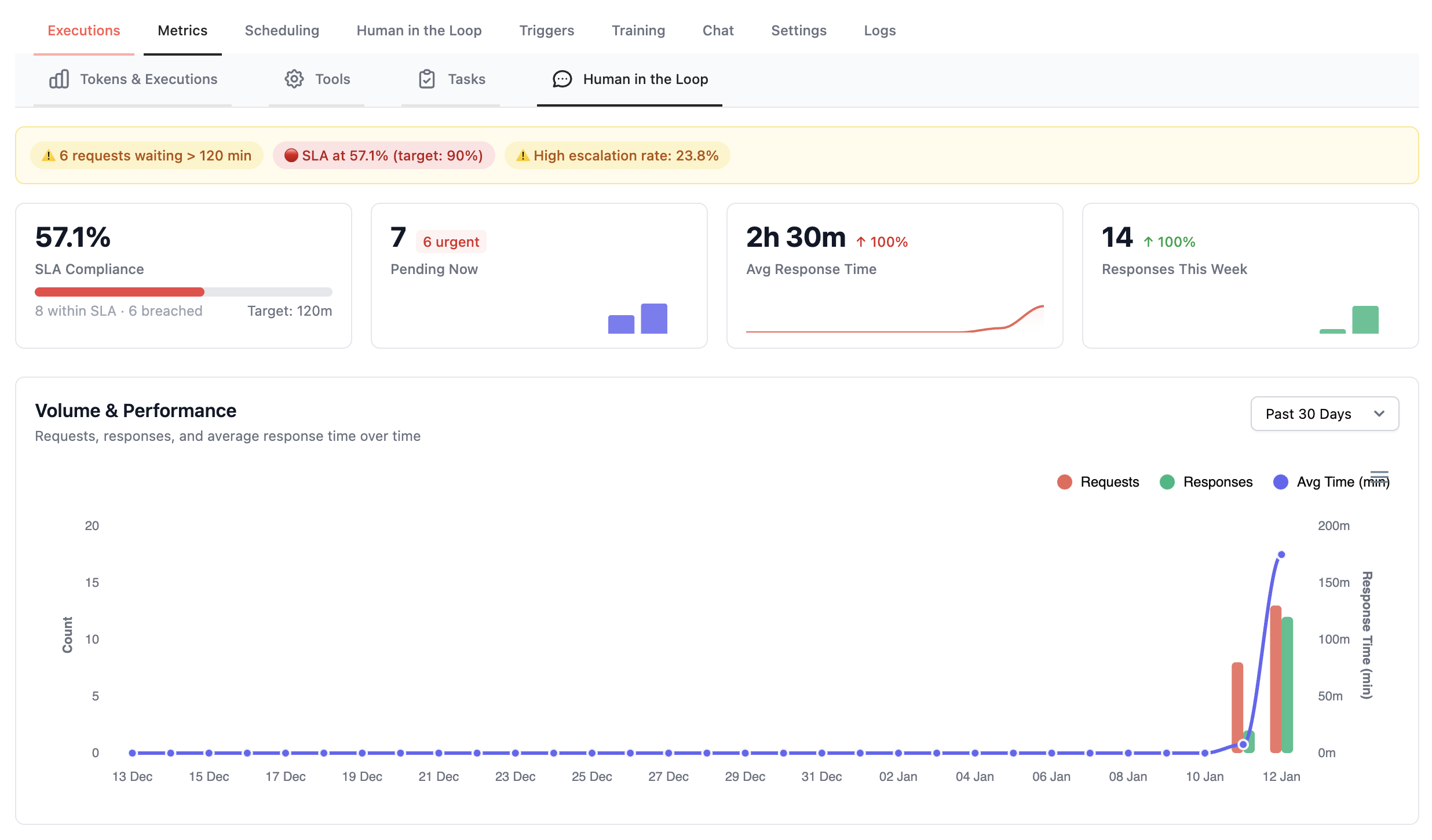
Response Times
Monitor average and median response times by reviewer or flow.
Volume Trends
Analyze review volume patterns to optimize team capacity.
Decision Distribution
View approval/rejection rates across different review types.
SLA Tracking
Track percentage of reviews completed within SLA targets.
Audit & Compliance
Section titled “Audit & Compliance”Enterprise-ready audit capabilities for regulatory requirements:
- Complete decision history with timestamps
- Reviewer identity verification
- Immutable audit logs
- Export capabilities for compliance reporting
Common Use Cases
Section titled “Common Use Cases”Security Reviews
Use Case: Internal security questionnaire automation with human validation
- AI generates responses to security questionnaires
- Security team reviews and validates accuracy via email
- Approved responses are compiled into final submission
- Full audit trail for compliance
Content Approval
Use Case: Marketing content requiring legal/brand review
- AI generates marketing copy or social media content
- Route to brand team email for voice/tone review
- Automatic publishing upon approval
Financial Approvals
Use Case: Expense reports, contract terms, budget allocations
- AI pre-processes and categorizes financial requests
- Route based on amount thresholds using dynamic assignment
- Maintain complete audit trail for financial compliance
Dynamic Assignment from CRM
Use Case: Route reviews to account owners from your CRM
- Flow fetches account owner email from CRM
- Store email in flow state (e.g.,
account_owner_email) - Use
assign_from_inputto route to the right person automatically
Quality Assurance
Use Case: AI output validation before customer delivery
- AI generates customer-facing content or responses
- QA team reviews via email notification
- Feedback loops improve AI performance over time
Webhooks API
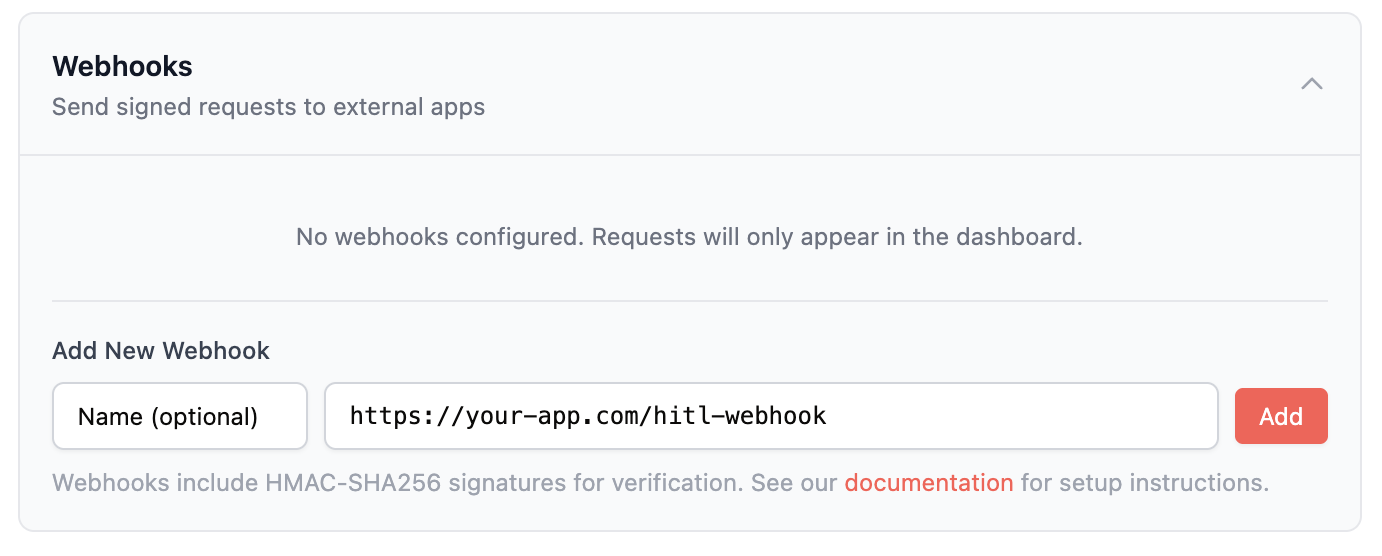
Section titled “Webhooks API”When your Flows pause for human feedback, you can configure webhooks to send request data to your own application. This enables:
- Building custom approval UIs
- Integrating with internal tools (Jira, ServiceNow, custom dashboards)
- Routing approvals to third-party systems
- Mobile app notifications
- Automated decision systems
Configuring Webhooks
Section titled “Configuring Webhooks”- Navigate to Settings
Go to your Deployment → Settings → Human in the Loop
- Expand Webhooks Section
Click to expand the Webhooks configuration
- Add Your Webhook URL
Enter your webhook URL (must be HTTPS in production)
- Save Configuration
Click Save Configuration to activate
You can configure multiple webhooks. Each active webhook receives all HITL events.
Webhook Events
Section titled “Webhook Events”Your endpoint will receive HTTP POST requests for these events:
| Event Type | When Triggered |
|---|---|
new_request | A flow pauses and requests human feedback |
Webhook Payload
Section titled “Webhook Payload”All webhooks receive a JSON payload with this structure:
{ "event": "new_request", "request": { "id": "550e8400-e29b-41d4-a716-446655440000", "flow_id": "flow_abc123", "method_name": "review_article", "message": "Please review this article for publication.", "emit_options": ["approved", "rejected", "request_changes"], "state": { "article_id": 12345, "author": "john@example.com", "category": "technology" }, "metadata": {}, "created_at": "2026-01-14T12:00:00Z" }, "deployment": { "id": 456, "name": "Content Review Flow", "organization_id": 789 }, "callback_url": "https://api.crewai.com/...", "assigned_to_email": "reviewer@company.com"}Responding to Requests
Section titled “Responding to Requests”To submit feedback, POST to the callback_url included in the webhook payload.
POST {callback_url}Content-Type: application/json
{  "feedback": "Approved. Great article!",  "source": "my_custom_app"}
Security
Section titled “Security”Webhook Security
Section titled “Webhook Security”- HMAC-SHA256 signatures: Every webhook includes a cryptographic signature
- Per-webhook secrets: Each webhook has its own unique signing secret
- Encrypted at rest: Signing secrets are encrypted in our database
- Timestamp verification: Prevents replay attacks
Signature Headers
Section titled “Signature Headers”Each webhook request includes these headers:
| Header | Description |
|---|---|
X-Signature | HMAC-SHA256 signature: sha256=<hex_digest> |
X-Timestamp | Unix timestamp when the request was signed |
Verification
Section titled “Verification”Verify by computing:
import hmacimport hashlib
expected = hmac.new(    signing_secret.encode(),    f"{timestamp}.{payload}".encode(),    hashlib.sha256).hexdigest()
if hmac.compare_digest(expected, signature):    # Valid signature
Error Handling
Section titled “Error Handling”Your webhook endpoint should return a 2xx status code to acknowledge receipt:
| Your Response | Our Behavior |
|---|---|
| 2xx | Webhook delivered successfully |
| 4xx/5xx | Logged as failed, no retry |
| Timeout (30s) | Logged as failed, no retry |
Security & RBAC
Section titled “Security & RBAC”Dashboard Access
Section titled “Dashboard Access”HITL access is controlled at the deployment level:
| Permission | Capability |
|---|---|
manage_human_feedback | Configure HITL settings, view all requests |
respond_to_human_feedback | Respond to requests, view assigned requests |
Email Response Authorization
Section titled “Email Response Authorization”For email replies:
- The reply-to token encodes the authorized email
- Sender email must match the token’s email
- Token must not be expired (7-day default)
- Request must still be pending
Audit Trail
Section titled “Audit Trail”All HITL actions are logged:
- Request creation
- Assignment changes
- Response submission (with source: dashboard/email/API)
- Flow resume status
Troubleshooting
Section titled “Troubleshooting”Emails Not Sending
Section titled “Emails Not Sending”- Check “Email Notifications” is enabled in configuration
- Verify routing rules match the method name
- Verify assignee email is valid
- Check deployment creator fallback if no routing rules match
Email Replies Not Processing
Section titled “Email Replies Not Processing”- Check token hasn’t expired (7-day default)
- Verify sender email matches assigned email
- Ensure request is still pending (not already responded)
Flow Not Resuming
Section titled “Flow Not Resuming”- Check request status in dashboard
- Verify callback URL is accessible
- Ensure deployment is still running
Best Practices
Section titled “Best Practices”-
Use Dynamic Assignment: Pull assignee emails from your flow state for flexible routing.
-
Configure Auto-Response: Set up a fallback for non-critical reviews to prevent flows from hanging.
-
Monitor Response Times: Use analytics to identify bottlenecks and optimize your review process.
-
Keep Review Messages Clear: Write clear, actionable messages in the
@human_feedbackdecorator. -
Test Email Flow: Send test requests to verify email delivery before going to production.