Human-in-the-Loop (HITL) Workflows
Human-in-the-Loop (HITL) is a powerful approach that combines artificial intelligence with human expertise to enhance decision-making and improve task outcomes. CrewAI provides multiple ways to implement HITL depending on your needs.
Choosing Your HITL Approach
Section titled “Choosing Your HITL Approach”CrewAI offers two main approaches for implementing human-in-the-loop workflows:
| Approach | Best For | Integration | Version |
|---|---|---|---|
Flow-based (@human_feedback decorator) | Local development, console-based review, synchronous workflows | Human Feedback in Flows | 1.8.0+ |
| Webhook-based (Enterprise) | Production deployments, async workflows, external integrations (Slack, Teams, etc.) | This guide | - |
Setting Up Webhook-Based HITL Workflows
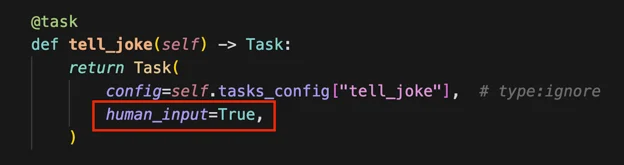
Section titled “Setting Up Webhook-Based HITL Workflows”- Configure Your Task
Set up your task with human input enabled:
- Provide Webhook URL
When kicking off your crew, include a webhook URL for human input:
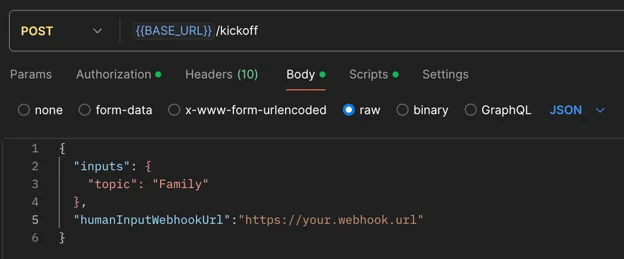
Example with Bearer authentication:
Terminal window curl -X POST {BASE_URL}/kickoff \-H "Authorization: Bearer YOUR_API_TOKEN" \-H "Content-Type: application/json" \-d '{"inputs": {"topic": "AI Research"},"humanInputWebhook": {"url": "https://your-webhook.com/hitl","authentication": {"strategy": "bearer","token": "your-webhook-secret-token"}}}'Or with Basic authentication:
Terminal window curl -X POST {BASE_URL}/kickoff \-H "Authorization: Bearer YOUR_API_TOKEN" \-H "Content-Type: application/json" \-d '{"inputs": {"topic": "AI Research"},"humanInputWebhook": {"url": "https://your-webhook.com/hitl","authentication": {"strategy": "basic","username": "your-username","password": "your-password"}}}' - Receive Webhook Notification
Once the crew completes the task requiring human input, you’ll receive a webhook notification containing:
- Execution ID
- Task ID
- Task output
- Review Task Output
The system will pause in the
Pending Human Inputstate. Review the task output carefully. - Submit Human Feedback
Call the resume endpoint of your crew with the following information:
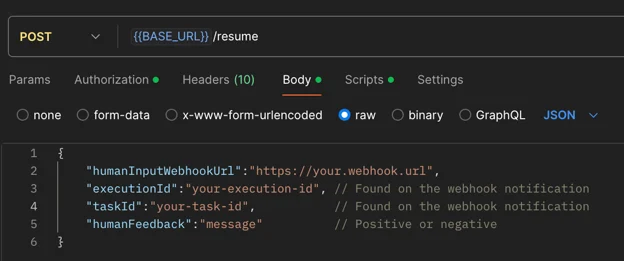
Example resume call with webhooks:
Terminal window curl -X POST {BASE_URL}/resume \-H "Authorization: Bearer YOUR_API_TOKEN" \-H "Content-Type: application/json" \-d '{"execution_id": "abcd1234-5678-90ef-ghij-klmnopqrstuv","task_id": "research_task","human_feedback": "Great work! Please add more details.","is_approve": true,"taskWebhookUrl": "https://your-server.com/webhooks/task","stepWebhookUrl": "https://your-server.com/webhooks/step","crewWebhookUrl": "https://your-server.com/webhooks/crew"}'This means:
- All information in your feedback becomes part of the task’s context.
- Irrelevant details may negatively influence it.
- Concise, relevant feedback helps maintain task focus and efficiency.
- Always review your feedback carefully before submission to ensure it contains only pertinent information that will positively guide the task’s execution.
- Handle Negative Feedback
If you provide negative feedback:
- The crew will retry the task with added context from your feedback.
- You’ll receive another webhook notification for further review.
- Repeat steps 4-6 until satisfied.
- Execution Continuation
When you submit positive feedback, the execution will proceed to the next steps.
Best Practices
Section titled “Best Practices”- Be Specific: Provide clear, actionable feedback that directly addresses the task at hand
- Stay Relevant: Only include information that will help improve the task execution
- Be Timely: Respond to HITL prompts promptly to avoid workflow delays
- Review Carefully: Double-check your feedback before submitting to ensure accuracy
Common Use Cases
Section titled “Common Use Cases”HITL workflows are particularly valuable for:
- Quality assurance and validation
- Complex decision-making scenarios
- Sensitive or high-stakes operations
- Creative tasks requiring human judgment
- Compliance and regulatory reviews
Enterprise Features
Section titled “Enterprise Features”Flow HITL Management Platform
CrewAI Enterprise provides a comprehensive HITL management system for Flows with in-platform review, responder assignment, permissions, escalation policies, SLA management, dynamic routing, and full analytics. Learn more →